
GL Period Turnover/Bal Spill
- On this Page:
- GL Turnover/Bal Spill
- Drill Down
The following functions hot link GL Period data, for many periods, to one GL or a Bunch by GL Heading Code/#CategoryCode/#ReportPL/#ReportBal, for a single company, in one call spilling out into adjacent cells.
See
Major Headings
heading list and #CategoryCode.
You will get Excel error "#SPILL!" if the function has not got enough space to write to adjacent cells.
Wizard: "Get GL Values Example Wizard" shows how to use the functions below. It's best to create a sheet using the wizard, to understand the use and possibilities.
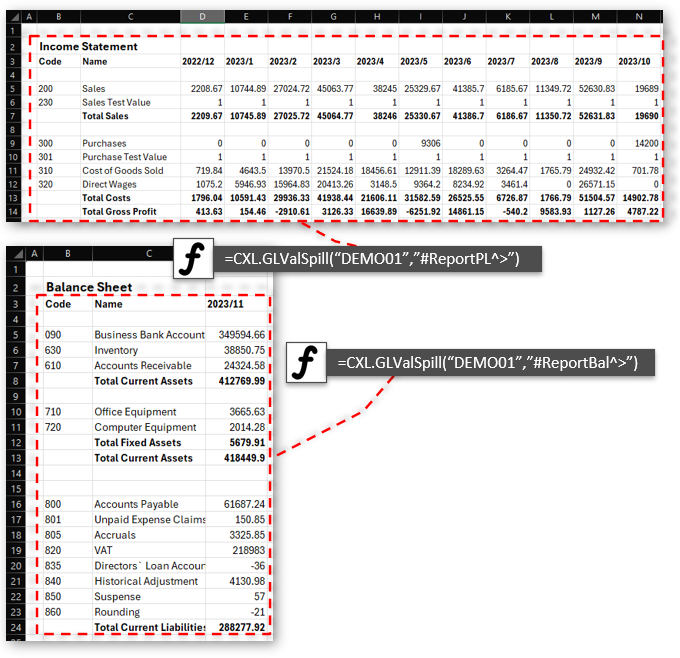
Get whole Balance Sheet or Income Statement from Xero, QuickBooks or Sage
Unless told otherwise will default to Balances Sheet current period
P&L 12 periods from current period
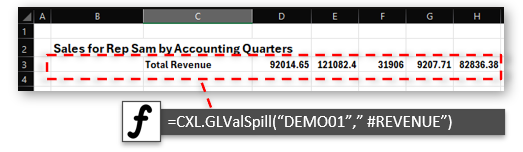
Get REVENUE Total for section from Xero, QuickBooks or Sage
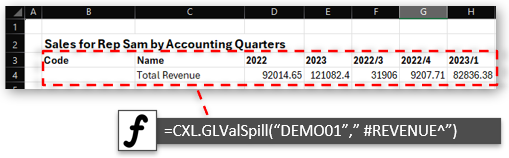
Add period headings, using "^"
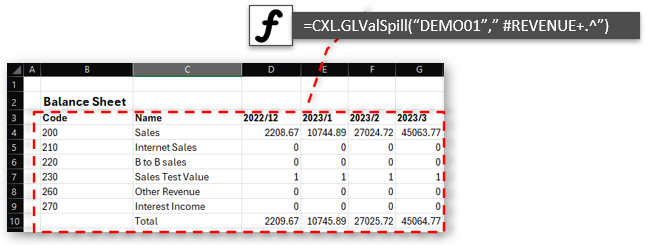
Get REVENUE section of Chart of Accounts for the Income Statement from Xero, QuickBooks or Sage
"+" Adds totals, "." Add child GL Accounts, ">" removes any zero lines
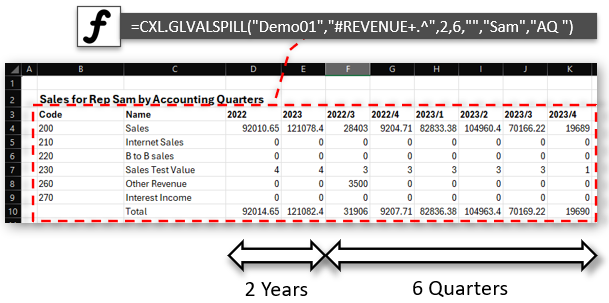
Get REVENUE section but in Accounting Quarter "AQ" for Rep "Sam"
with 2 years Totals and 6 Quarters in columns
"+" Adds totals, "." Add child GL Accounts, ">" removes any zero lines
Note: Balance sheet item values are reported at the end of a financial year or reflect the current balance for this financial year.
For a tutorial on this function, click here
Examples
| Get Profit and Loss Report for COMP_A company for current financial year | |
| with totals+headings: |
=CXL.GLValSpill( "COMP_A", "#ReportPL+^>" )
A complete Profit and Loss for 12 periods, filtered out zero rows |
| no totals+headings: | =CXL.GLValSpill( "COMP_A", "#ReportPL", ) |
| Get Sales Report for COMP_A company | |
| with totals+headings: |
=CXL.GLValSpill( "COMP_A", "#CatSALES+^>" )
A complete Revenue breakdown for the last 12 periods |
| See Major Headings for these '#' codes. #OTHERINCOME,#COS,#OVERHEADS,#BANK, #ASSET, #LIABILITY, etc. | |
| Cost of Sales: |
=CXL.GLValSpill( "COMP_A", "#COS^>." )
Cost of Sales breakdown for the last 12 periods |
| And by Quarter: |
=CXL.GLValSpill( "COMP_A", "#COS^>.", 0, 12, "", "", "AQ" )
Last 12 Quarters (for 3 years) |
| From specific year and period: |
=CXL.GLValSpill( "COMP_A", "#COS^>.", 0, 12, "", "", "AQ", "", 2025 )
Last 12 Quarters (for 3 years) |
| Convert to EUR currency: |
=CXL.GLValSpill( "COMP_A", "#COS^>.", 0, 12, "", "", "AQ, toEUR", "", 2025 )
Last 12 Quarters (for 3 years) |
| Combine values for parameters: | =CXL.Combine( D3, D4 ) more Combine Examples |
|
Returns "AQ, toEUR" from cell ref D3 and D4 Takes an array of referances. Thus we can put values in cells, and combine them to make a list of values for CXL function parameters. Blank values are ignores |
|
| +child GL Accounts: | =CXL.GLValSpill( "COMP_A", "#COS^>." ) |
| Get Profit and Loss Report for COMP_A company for financial year 2025 | |
| 2 years+12 periods: |
=CXL.GLValSpill( "COMP_A", "#ReportPL^>", 2, 12, "", "", "", "", 2025, 1 )
The years listed would be 2024 and 2025 |
| Get Profit and Loss Report for COMP_A company for 2025 in financial quaters | |
| 2 years+6 quarters: |
=CXL.GLValSpill( "COMP_A", "#ReportPL^>", 2, 6, "", "", "AQ", "", 2025, 1 )
The years listed would be 2024 and 2025 |
| Get Profit and Loss Report for COMP_A company for 2025 in financial quaters | |
| 2 years+6 quarters: |
=CXL.GLValSpill( "COMP_A", "#ReportPL^>", 2, 6, "", "", "CQ", "", 2025, 1 )
The years listed would be 2024 and 2025 calander years |
| Get Profit and Loss Report for COMP_A company for 2025 in calander months | |
| 2 years+8 months: |
=CXL.GLValSpill( "COMP_A", "#ReportPL^>", 2, 8, "", "", "C", "", 2025, 1 )
The years listed would be 2024 and 2025 calander years |
| And by Analysis Codes: | |
| by Rep MARK: |
=CXL.GLValSpill( "COMP_A", "#ReportPL^>", 2, 12, "MARK", "", "", "", 2025, 1 ) Where MARK is Tracking 1 or Class code |
| by Area NORTH: |
=CXL.GLValSpill( "COMP_A", "#ReportPL^>", 2, 12, "", "NORTH", "", "", 2025, 1 ) Where NORTH is Tracking 2 or Location code |
| Current Bank Balances | |
| with totals+headings:: | =CXL.GLValSpill( "COMP_A", "#BANK^+." ) |
Wizard: "Get GL Values Example Wizard" shows how to use the functions below. It's best to create a sheet using the wizard, to understand the use and possibilities.
Parameters:
| Parameter | Description |
|---|---|
| CompCode |
Single Company code Short code assigned by Consolidated XL, or by you to identify your company |
| GLCode |
Gl Code, List of GL comma seperated. g Or Major Heading,Report or Category #ReportBAL or #ReportPL to get Balance Sheet or P&L for one company If Major Heading end in "." then list child accounts, e.g. "#REVENUE." ";" as ".". QuickBooks: They are indented if subaccount, add "NOINDENT" to options to turn this off. "#CatSales", "#CatCurLiab" give all GL under Section pref See Major Headings for these '#' codes. #OTHERINCOME,#COS,#OVERHEADS,#BANK, #ASSET, #LIABILITY, etc. "+" adds Totals" ">" Filter Zero Value Rows" "^" adds Column headings such as Periods These can be expressed in Options also |
| [NoYears] |
0-5 Number of year total columns to show before periods 102 or 105 wil show YTD 2 years or 5 years If option contains "ShowYTD", then x YTD columns If option contains "ShowBoth", then x Total and YTD columns |
| [NoPeriods] |
Optional, if not specified then returns the Current Balance/YTD figure if NoPeriods=6 then it lists 6 periods from the current Year/Period if FromYear/FromPeriod are set then 6 from specified Year/Period Max value is 3 Years for Weeks (156), 5 years for 12 (60) month periods |
| [CC_Track1_Class]/ [Dep_Track2_Loc] |
Optional - Filter by Cost Centre/Department AKA as Tracking codes in Xero and Classes/Locations in QuickBooks |
| [Options] |
Optional - Comma delimited list by default it will list Code, Name, and Period figures. "^" or "AddTitle" Adds a title at top listing criteria "AddHeading" adds Column Headings for Periods "RevPeriods" reverse the order of periods "RevYears" reverse Year Total/YTD Columns "+" or "ShowTotal" adds a total at bottom "." or "ShowChildren" if Major heading specified (#REVENUE) then list all accounts under, "#REVENUE." will do same "NOINDENT" stop indent of sub Codes (QuickBooks) ">" or "NoZeros" Remove Zero Rows Enable Columns "ShowYTD" Show NoYears YTD Columns "ShowBoth" Show NoYears Total and YTD Columns "NoCode" Hide Code Column "NoDesc" Hide Description Column Period “A” gives by Financial Accounting Period (Default) “AQ” Financial Accounting Period Quarter “CQ” Calendar Period Quarter “C” gives by Calendar Month “W” gives by Calendar Week (Week 1 starting first Monday in year) Reporting Basis: By default the Reporting Basis is Accrual, but is set in the Consolidated XL settings for each company "CASH" will override to Cash Accounting "ACCRUAL" will override to Accrual Accounting Currencies: "GBP", "USD", "EUR" etc will give all figures posted in that Currency "toUSD", "toEUR" will convert all Home currencies to Currency "toUSD202304", "toEUR202304" will convert all Home currencies to Currency as of the end of Year/Month 2023 April Currency Rates are updated every night |
| [Style] |
Optional - Period Headings style |
| [FromYear]/[FromPeriod] |
Specify the point in time to Query |
GL Account Drill Down:
Selecting CXL figures in the sheet and then selecting "Chart" menu shows CXL Quick Charts:
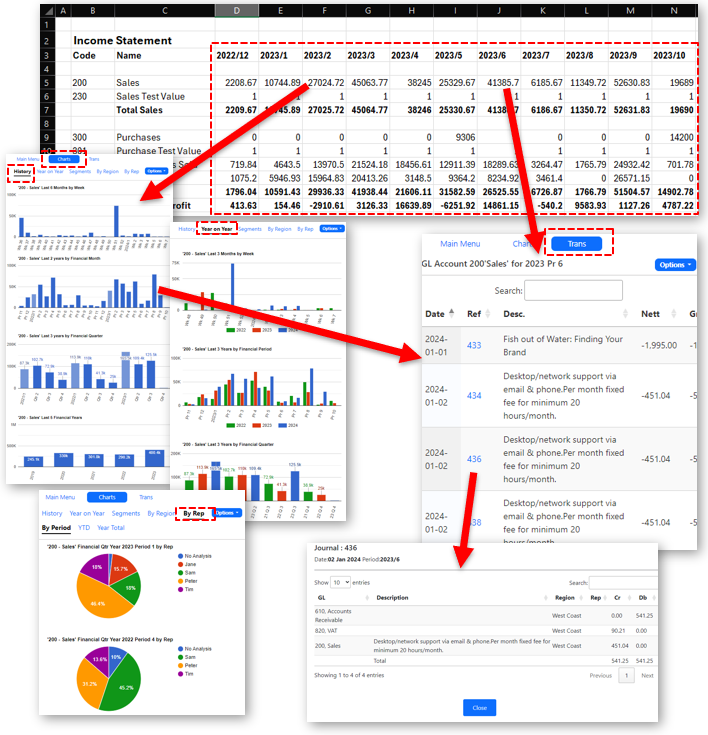
Selecting CXL figures in the sheet and then selecting "Chart" menu shows CXL Quick Charts
showing the GL Account Turnover in a chart.
The "Trans" menu shows all transactions for the current selected period and GL Account.
Clicking on the chart columns wil drill down to the transactions in each period.