
GL Period Turnover/Balance
To produce the financial reports, we use Consolidated XL functions to hot link the financial data from Xero or QuickBooks by Accounting Period (default)/Quarter (AQ), Calendar Month(C)/Quarter(CQ) (Jan-Dec), or 52 weeks (W) of the year (Jan-Dec).
Wizard: "Get GL Values Example Wizard" shows how to use the functions below. It's best to create a sheet using the wizard, to understand the use and possibilities.
CXL Reporting Mode
By default, Consolidated XL will return figures based on Accrual Accounting. This can be changed by pressing ... button on the Consolidated XL side panel next to the appropriate company, and selecting "Settings". Then change "CXL Reporting Mode" to "Same as system" or "Cash Accounting". This change can then be forced to all companies by pressing To All button. Please read this if using Xero
Company Code
"CompCode" is a short code assigned to each company. We provide three examples of companies, EXAMP01-03. Your Consolidated XL will apply "MARK01" to "Marks Chocolate Company", but you can rename it if you wish using the options menu against each company listed in the UI.
We will use EXAMP01 in the following examples:
GL Period Values
In the following functions GLBal(), GLVal(),GLCr() and GLDb() are used to get figures for periods, both for financial periods and calendar months, weeks, and quarters from QuickBooks, Sage Accounting or Xero to a single cell, usefull for Multi-company consolidation. We also have a GL function which gets many periods using one function call for one company.
In addition to these ultra efficent FAST functions we have the function GLValDate() which get the total value between two dates from P&L figures, and optionally filter by Cost Centre and Departments (Tracking codes (Xero) Class/Location (Quickbooks))
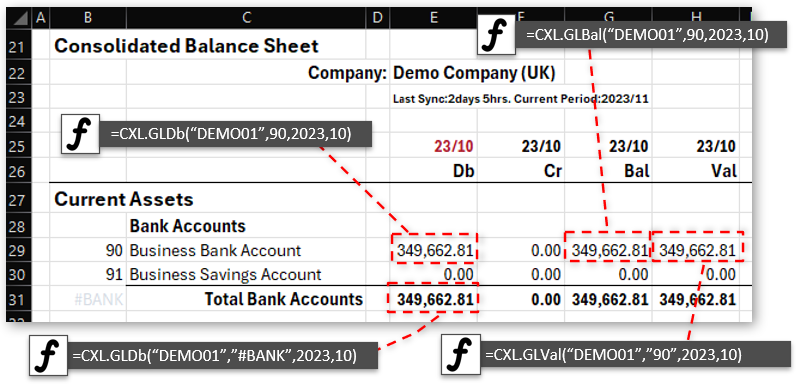
Get GL Values using GLDb, GLCr and GLBal
GLVal negates the appropriate values for easy reporting
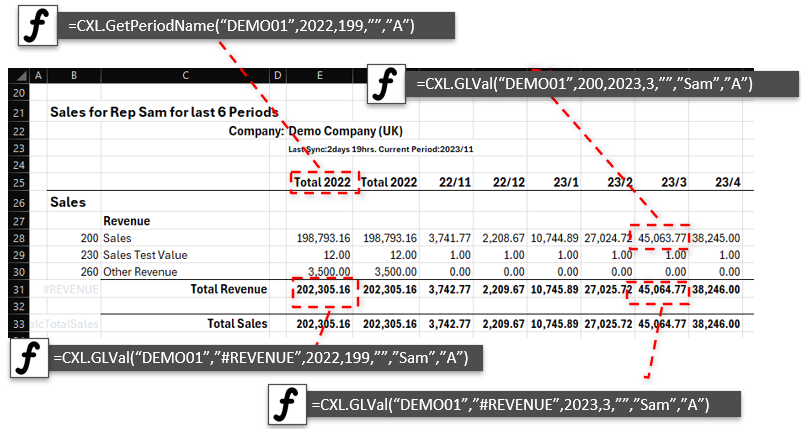
Get GL Values using GLVal which negates the appropriate values P&L or Income Statement
We are also filtering by Rep "Sam", and have two columns to get YTD figures (period 0)
GetPeriodName() takes care of all the column headings for us automatically
We are using #REVENUE to get total for all under the revenue heading.
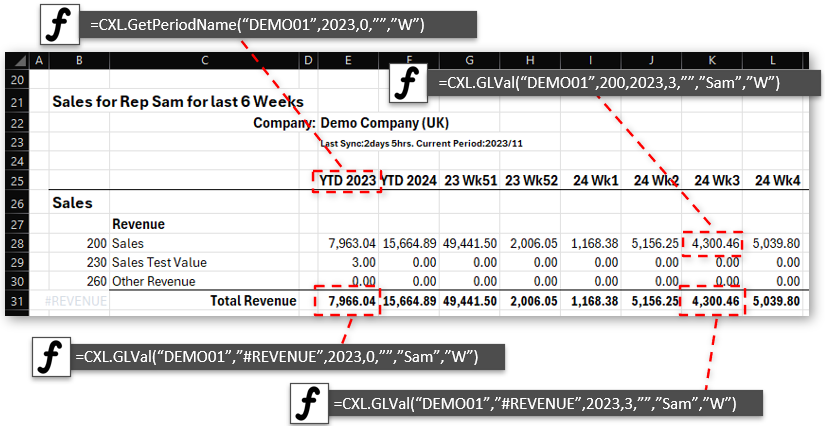
We now have the same report but for Weeks by simply changing the Options paramter to "W"
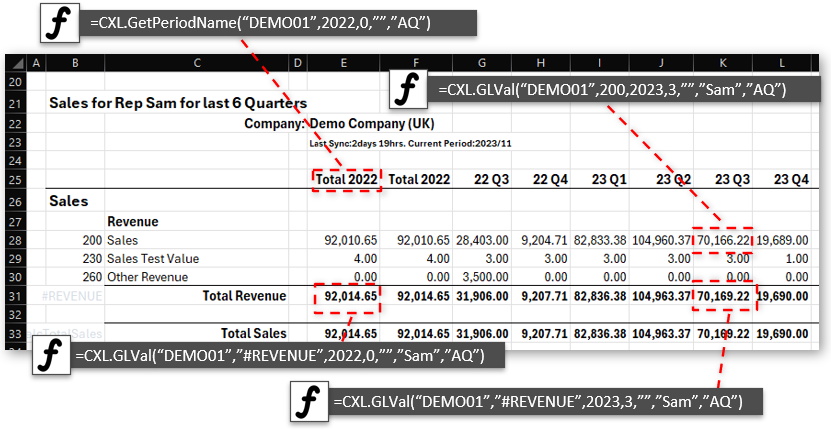
And no by Quarters by simply changing the Options parameter to "AQ"
See
Major Headings for these '#' codes. #OTHERINCOME,#COS,#OVERHEADS,#BANK, #ASSET, #LIABILITY, etc.
BalanceSheet
Performance Rated:A
The Balance (Debits-Credits) for GL Accounts can be obtained using this function. For trial balance reporting, etc., this is used.
Note:Balance sheet item values are reported at the end of a financial year or reflect the current balance for this financial year.
P&L / INCOME STATEMENT
Performance Rated:A
For a tutorial on this function, click here
It is often the case that we want Sales figures that GLBal would return as negative values, since they are Credits in the Chart of Accounts. For such cases, it is better to use GLVal function, which returns negated values when approprate.
Syntax: =CXL.GLValDate( CompCode, GlCodeRange, FromDate, UptoDate, [CC_Track1_Class], [Dep_Track2_Loc], [Options] )Performance Rated:D
Similar to GLVal() but queried by FromDate to UptoDate. #SALES will get all sales totals, etc. P&L and Accrual Accounting only.
Trial Balance
Performance Rated:A
Performance Rated:A
Balance period Credit/Debits can be extracted from Xero, Sage Accounting and QuickBooks.
Note:Balance sheet item values are reported at the end of a financial year or reflect the current balance for this financial year.
Examples: Get Turnover for GL 310 Sales Clothing
| Example Query | Function and Parameters |
|---|---|
| Get 310 Total Turnover 2023 Current Period | =CXL.GLVal( “EXAMP01”,310,2023,0,”” ) |
| Get 310 Turnover for 2023, YTD | =CXL.GLVal( “EXAMP01”,310,2023,100,”” ) |
| Get 310 Turnover for 2023, Period 1 | =CXL.GLVal( “EXAMP01”,310,2023,1,”” ) |
| Get 310 Turnover for 2023, Period 2 | =CXL.GLVal( “EXAMP01”,310,2023,2,”” ) |
| Get 310 Total Turnover for 2023 Period 1-12 | =CXL.GLVal( “EXAMP01”,310,2023,112,”” ) |
| Get 310 Total Turnover for 2023, Period 1-6 | =CXL.GLVal( “EXAMP01”,310,2023,106,”” ) |
| Get 310 Turnover for Jan and Feb | =CXL.GLValDate( “EXAMP01”,"310",1/1/2024,1/3/2024,"" ) |
Examples: Get Net Profit for Sales Clothing
GL 310 Sales Clothing - COS 410 Clothing Cost of Sales
| Example Query | Function and Parameters |
|---|---|
| Get 310-410 Net Profit for 2023, Period 1 | =CXL.GLVal( “EXAMP01”,"310-410",2023,1,"" ) |
| Get 310-410 Net Profit for 2023, Period 2 | =CXL.GLVal( “EXAMP01”,"310-410",2023,2,"" ) |
| Get 310-410 Net Profit for Year 2023 | =CXL.GLVal( “EXAMP01”,"310-410",2023,112,"" ) |
| Get 310-410 Net Profit for Jan and Feb | =CXL.GLValDate( “EXAMP01”,"310-410",1/1/2024,1/3/2024,"" ) |
Examples: Get SUM of series of GL’s Accounts
Add some sales less Cost of Sales (310+315+320)-410
| Example Query | Function and Parameters |
|---|---|
| Get (310+315+320)-410 Turnover for 2023, Period 1 | =CXL.GLVal( “EXAMP01”,"310,315,320,-410",2023,1,"" ) |
| Get (310+315+320)-410 Turnover for 2023, Period 2 | =CXL.GLVal( “EXAMP01”,"310,315,320,-410",2023,2,"" ) |
| Get (310+315+320)-410 Turnover for Year 2023 | =CXL.GLVal( “EXAMP01”,"310,315,320,-410",2023,112,"" ) |
| Get (310+315+320)-410 Turnover for Jan and Feb | =CXL.GLValDate( “EXAMP01”,"310,315,320,-410",1/1/2024,1/3/2024,"" ) |
Examples: Get Sales Major Heading Turnover
CXL summarises parent categories to give “#SALES”,”#COS”,”#PROFIT”,”#OVERHEAD”. See list for Major Headings
| Example Query | Function and Parameters |
|---|---|
| Get Sales Heading Turnover for 2023, Period 1 | =CXL.GLVal( “EXAMP01”,"#SALES",2023,1,"" ) |
| Get Sales Heading Turnover for 2023, Period 2 | =CXL.GLVal( “EXAMP01”,"#SALES",2023,2,"" ) |
| Get Sales Heading Turnover for Year 2023 | =CXL.GLVal( “EXAMP01”,"#SALES",2023,112,"" ) |
| Get Sales Heading Turnover for Jan and Feb | =CXL.GLValDate( “EXAMP01”,"#SALES",1/1/2024,1/3/2024,"" ) |
Example: Credit/Debit of 090 - Business Bank Account
| Example Query | Function and Parameters |
|---|---|
| Get 090 Total Credits for 2023, Period 1 | =CXL.GLCr( “EXAMP01”,90,2023,1,”” ) |
| Get 090 Total Credits for 2023, Period 2 | =CXL.GLCr( “EXAMP01”,90,2023,2,”” ) |
| Get 090 Total Debits for 2023, Period 1 | =CXL.GLDb( “EXAMP01”,90,2023,1,”” ) |
| Get 090 Total Debits for 2023, Period 2 | =CXL.GLDb( “EXAMP01”,90,2023,2,”” ) |
Wizard: Try out the Income Statement/P&L Wizard or the Get GL Values Demo Wizard , which generates multiple sheets. The "CXL Lookups" demonstrates this feature in action and serves as an excellent starting point for your report creation.
Parameters:
| Parameter | Description |
|---|---|
| CompCode | Short code assigned by Consolidated XL, or by you to identify your company. |
| GlCodeRange |
“30” or name “Clothing Sales” List “310,315,410” or “310,315,-410” gives (310+315)-410 Values from Major Headings. “#SALES”,”#COS”,”#PROFIT”,”#OVERHEAD” See Major Headings for these '#' codes. #OTHERINCOME,#COS,#OVERHEADS,#BANK, #ASSET, #LIABILITY, etc. Quickbooks:If options contains 'ADD' a total for all sub accounts will be returned |
| Year | Specific Year, e.g. 2023 |
| Period |
Accounting Or Calander Periods: P&L or Income Statement 0 YTD Turnover Year=0 and Period=0 (or parameter not specified) gives YTD figure Year=2023 and Period=0 gives YTD figure 2023 1-12 gives specific Turnover for Period 103 give periods 1-3 Turnover 106 give periods 1-6 Turnover 112 All 12 periods Turnover 199 Total for year Balance Sheet The value returned will be either: Year=0 and Period=0 current Balance Year=2023 balance at the end of the financial year 2023 Period is ignored For Weeks: Figures for P&L/Income Statement GL Accounts + Bank Accounts, Major Headings and Control Accounts are tracked 1-52 gives specific Turnover for Week 0 Current Week Turnover 100 YTD Total Turnover 126 weeks 1 to 26 if asked by weeks Turnover 199 Total for year Weeks are based on Accrual Accounting only For Quarters: Figures for P&L/Income Statement GL Accounts + Bank Accounts, Major Headings and Control Accounts are tracked 1-4 gives specific Turnover for Week 0 Current Quarter Turnover 100 YTD Total Turnover 104 Quarter 1 to 4 if asked by Quarters Turnover 199 Total for year |
| FromDate/[UptoDate] |
Used with GLValDate FromDate must be a given date. e.g start of year. [UptoDate] upto the day before date. Blank will be up today. e.g. FromDate=1 feb 2023, UptoDate=1 mar 2023 will give all transactions for feb 2023. |
| [CC_Track1_Class]/ [Dep_Track2_Loc] |
Optional - Filter by Cost Centre/Department AKA as Tracking codes in Xero and Classes/Locations in QuickBooks |
| [Options] |
Optional Comma delimited list of Options, first work of each to demote: “A” gives by Financial Accounting Period (Default) “AQ” Financial Accounting Period Quarter “CQ” Calendar Period Quarter “C” gives by Calendar Month “W” gives by Calendar Week (Week 1 starting first Monday in year) Reporting Basis: By default the Reporting Basis is Accrual, but is set in the Consolidated XL settings for each company "CASH" will override to Cash Accounting "ACCRUAL" will override to Accrual Accounting Currencies: "GBP", "USD", "EUR" etc will give all figures posted in that Currency "toUSD", "toEUR" will convert all Home currencies to Currency "toUSD202304", "toEUR202304" will convert all Home currencies to Currency as of the end of Year/Month 2023 April Currency Rates are updated every night Parents: By default Consolidated XL will return the Value Or Balance for the code specified "ADD" will add all parent values (QuickBooks) Combination of Options: The options can be combines "C,toUSD" would produce a report in USD in Calendar Periods Function CXL.CombineOptions(Opt1,Opt2,...) can be used to combine and remove first word of each Option Debugging problems: Normally the function will return 0 if a GL,CC or Dep does not exist to aid consolidation where codes dont exist accross companies. "DEBUG" or "?" will make the functions return Error if codes do not exist |
GL Account Drill Down:
Selecting CXL figures in the sheet and then selecting "Chart" menu shows CXL Quick Charts:
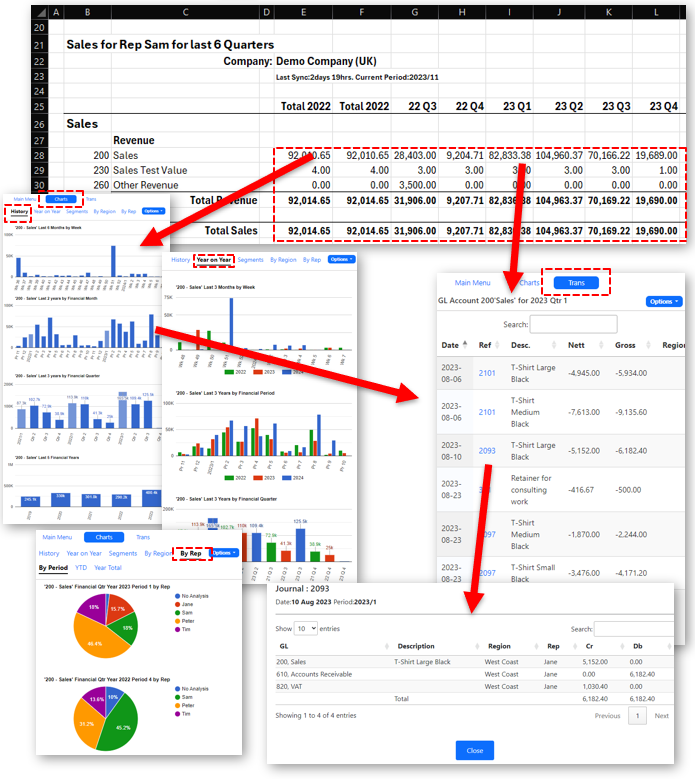
The "Trans" menu shows all outstanding transactions for the current selected period.
Clicking on the chart columns wil drill down to the transactions in each period.
GL Period Values by Cost Centres and Departments
Consolidated XL powerful functions can also analyse the accounting data by Cost Centres and Departments in Sage Accounting, known as Tracking Codes in Xero, Class/Locations in QuickBooks.
Syntax
All Performance Rated:A
Examples: Get Turnover for GL 310 Sales Clothing for "North Region"
| Example Query | Function and Parameters |
|---|---|
| Get 310 Turnover for 2023, Period 1 | =CXL.GLVal( “EXAMP01”,310,2023,1,"North","","" ) |
| Get 310 Turnover for 2023, Period 2 | =CXL.GLVal( “EXAMP01”,310,2023,2,"North","","" ) |
| Get 310 Turnover for Year 2023 | =CXL.GLVal( “EXAMP01”,310,2023,112,"North","","" ) |
| Get 310 Turnover since 1/1/2024 | =CXL.GLValDate( “EXAMP01”,310,1/1/2024,,"North","","" ) |
| Get 310 Turnover Jan and feb | =CXL.GLValDate( “EXAMP01”,310,1/1/2024,1/3/2024,"North","","" ) |
This principle can then be applied to all the other previous examples. So..
Examples: Get Sales, Cost of Sales or Overheads Turnover for "North Region"
CXL summarises parent categories to give “#SALES”,”#COS”,”#PROFIT”,”#OVERHEAD”. See list for Major Headings
| Example Query | Function and Parameters |
|---|---|
| Get "Sales" Turnover for 2023, Period 1 | =CXL.GLVal( “EXAMP01”,"#SALES",2023,1,"North","","" ) |
| Get "Sales" Turnover for 2023, Period 2 | =CXL.GLVal( “EXAMP01”,"#SALES",2023,2,"North","","" ) |
| Get “Cost of Sales” Turnover for Year 2023 | =CXL.GLVal( “EXAMP01”,"#COS",2023,112,"North","","" ) |
| Get “Overheads” Turnover for Year 2023 | =CXL.GLVal( “EXAMP01”,"#OVERHEAD",2023,112,"North","","" ) |
| Get “Overheads” Turnover for Jan and Feb | =CXL.GLValDate( “EXAMP01”,"#OVERHEAD",1/1/2024,1/3/2024,"North","","" ) |
Wizard: Try out the Income Statement/P&L Wizard or the Get GL Values Demo Wizard , which generates multiple sheets. The "CXL Lookups" demonstrates this feature in action and serves as an excellent starting point for your report creation.
And for different Period Structures
CXL summarises parent categories to give “#SALES”,”#COS”,”#PROFIT”,”#OVERHEAD”. See list for Major Headings
Examples: Get Sales Turnover by Accounting Period
We have seen examples of this above. [Options] is left blank or "A".
| Example Query | Function and Parameters |
|---|---|
| Get Total “Motor Vehicle Expenses” for Year 2023 periods 1-6 for "North" | =CXL.GLVal( “EXAMP01”,"449",2023,106,"North","","" ) |
| Get Total “Overheads” for Year 2023 periods 1-6 for "North" | =CXL.GLVal( “EXAMP01”,"#OVERHEAD",2023,106,"North","","" ) |
| Get Total “Overheads” for Year 2023 for "North" | =CXL.GLVal( “EXAMP01”,"#OVERHEAD",2023,112,"North","","" ) |
Examples: Get Cost of Sales Turnover by Calendar Month
| Example Query | Function and Parameters |
|---|---|
| Get “Cost of Sales” Turnover January 2023 for "North" | =CXL.GLVal( “EXAMP01”,"#COS",2023,1,"North","","C" ) |
Examples: Get Sales Major Heading Turnover by Quarters or Weeks
| Example Query | Function and Parameters |
|---|---|
| Get "Sales" Turnover for 2023 Quarter 1 for "North" | =CXL.GLVal( “EXAMP01”,"#SALES",2023,1,"North","",”Q” ) |
| Get "Sales" Turnover for 2023, Week 2 for "North" | =CXL.GLVal( “EXAMP01”,"#SALES",2023,2,"North","",”W” ) |