
Currency Functions Pro
- On this Page:
- Get Currency Name
- Get Rate
- Unrealised Currency
The following functions give access to Currency data.
All of the following requires the Pro version. see Prices
Please read the currency section for each accounts package Xero, Sage Accounting and QuickBooks for the particulars.
Get Currency Name
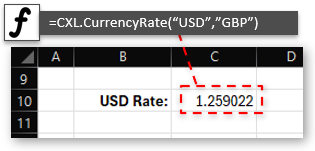
Hourly Currency rate between Home Currency and specified Currency
Performance Rated:B
This will get the Currency name given the short ISO CurencyCode.
Parameters:
| Parameter | Description |
|---|---|
| CurencyCode |
ISO Currency code e.g.USD, EUR, GBP... |
Get Currency Rate
Performance Rated:B
Current hourly rate Consolidated XL is using, or as of end calendar month using "USD202304" or "EUR202304" for Currency rate as of the end of Year/Month 2023 April.
Parameters:
| Parameter | Description |
|---|---|
| CurencyCode |
ISO Currency code e.g.USD, EUR, GBP... USD202204, EUR202204 will give the rate at end of April 2022 |
| [HomeCurrencyCode] | If left blank will show USD currency rates, if set CurencyCode to HomeCurrencyCode rate |
Get Current Unrealised Currency
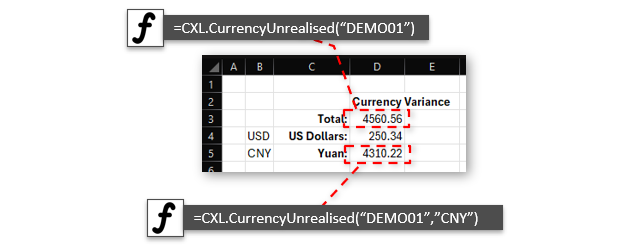
Get Unrealised Currency value for all or specific Currencies.
Performance Rated:B
This will get the Unrealised Currency value (Difference in value of all outstanding Receivable/Payables due to currency rate changes) for a currency, or if "" for all currencies for reporting.
This value is also accounted for in "Unrealised Currency Gains" GL Account. And "Accounts Receivable" and "Accounts Payable" adjusted accordingly
Please see the following FAQ sections on each accounting package for more information how currency is accounted for. Xero Currency, QuickBooks Currency or Sage Accounting Currency
Parameters:
| Parameter | Description |
|---|---|
| CompCode | Short code assigned by Consolidated XL, or by you to identify your company. |
| [CurencyCode] |
Optional ISO Currency code e.g.USD, EUR, GBP for Unrealised Currency value for a particular currency Blank for Total Unrealised Currency Value |